> For the complete documentation index, see [llms.txt](https://codico-dispatch.gitbook.io/documentation/llms.txt). Markdown versions of documentation pages are available by appending `.md` to page URLs; this page is available as [Markdown](https://codico-dispatch.gitbook.io/documentation/system-settings/booking-limits-and-rules.md).
# Booking Limits & Rules
Deadlines, automatic assignment, payment rules and booking hours.
**System Settings → Booking Limits & Rules** controls how bookings are accepted, changed and assigned. The page has four groups.
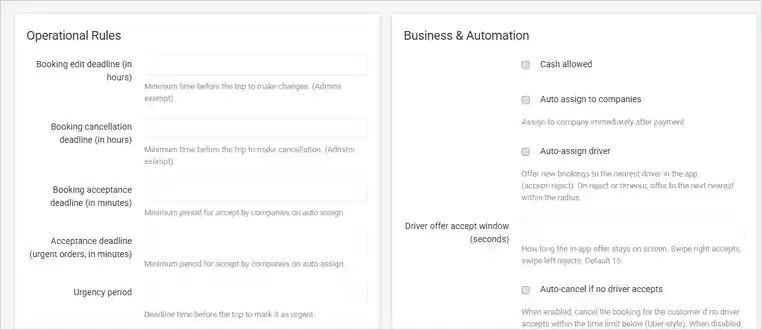
Booking Limits & Rules (values hidden in the demo).
## Operational Rules
| Setting | Meaning |
| --------------------------------------------------------------------- | ------------------------------------------------------------------------------------------------- |
| **Booking edit deadline (in hours)** | Minimum time before the trip to make changes. Admins are exempt. |
| **Booking cancellation deadline (in hours)** | Minimum time before the trip to cancel. Admins are exempt. |
| **Booking acceptance deadline (in minutes)** | How long a company has to accept a booking on automatic assignment. |
| **Edit / Cancellation / Acceptance deadline (city taxi, in minutes)** | The same deadlines for city taxi rides. |
| **Edit / Cancellation / Acceptance deadline (delivery, in minutes)** | The same deadlines for deliveries. |
| **Acceptance deadline (urgent orders, in minutes)** | The acceptance time for urgent bookings. |
| **Urgency period** | How close to the trip a booking is marked as urgent. |
| **Allow offer price (hours)** | The period in which companies may offer a price. |
| **Booking date term** (also for city taxi and delivery) | Minimum lead time before the trip starts. Admins are exempt. |
| **Auto-assign max radius (km)** | The maximum radius for automatic assignment. |
| **City taxi maximum radius** / **Delivery maximum radius** | The maximum zone radius in kilometres for city taxi and delivery. |
| **Default partner commission (%)** | The commission given to new [referral partners](/documentation/people-and-companies/partners.md). |
## Booking Form & Display
| Setting | Meaning |
| ------------------------------------- | -------------------------------------------------------------------------- |
| **Full address only** | Customers must enter the exact street and house number. |
| **Redirect to cabinet after booking** | Sends the customer to their account after booking. |
| **Cabinet uses new widget** | The customer account uses the new booking form. |
| **Vehicles show discount price** | Shows discounted prices on vehicle classes. |
| **Enable "Lady-ga" vehicles** | Adds a "Lady-ga" label; these bookings are assigned only to women drivers. |
| **Show full price** | Shows the full booking price to subcontractor companies and drivers. |
## Business & Automation
| Setting | Meaning |
| ------------------------------------------------------- | -------------------------------------------------------------------------------------------------------------------------------------------------------- |
| **Cash allowed** | Customers can pay in cash. |
| **Auto assign to companies** | Assigns a booking to a company right after payment. |
| **Auto-assign driver** | Offers new bookings to the nearest driver in the app. If the driver rejects or doesn't answer, the next nearest driver within the radius gets the offer. |
| **Driver offer accept window (seconds)** | How long the offer stays on the driver's screen. Swipe right to accept, left to reject. Default 15. |
| **Auto-cancel if no driver accepts** | Cancels the booking for the customer if no driver accepts in time. When off, the booking is rejected or falls back to the company. |
| **Auto-cancel if no driver within (minutes)** | The total time from the first offer until the booking is cancelled. |
| **Auto-refund** | Refunds the full amount automatically on cancellation. |
| **Booking allow price override** | Allows the price of a booking to be changed. |
| **Show invoice only after payment** | Shows the invoice only once the booking is paid. |
| **Zone-to-Zone Mode** | Calculates prices and availability by [zones](/documentation/locations-and-rules/custom-zones.md). |
| **Zone resolver considers division** | Uses the division when finding zones. |
| **One price for transfers, city taxis, and deliveries** | Uses the same prices for all ride types. |
## Booking Form Availability
| Setting | Meaning |
| ------------------------------------------- | ------------------------------------------------------------------- |
| **Scheduled task time (GMT)** | When the daily background tasks for bookings run. |
| **Disable booking** | Stops all new bookings. Administrators can still book. |
| **Disable booking daily from / till (GMT)** | Stops new bookings during these hours every day. Admins are exempt. |
{% hint style="warning" %}
Times in this group are in GMT. Convert them from your local time.
{% endhint %}
---
# Agent Instructions
This documentation is published with GitBook. GitBook is the documentation platform designed so that both humans and AI agents can read, navigate, and reason over technical content effectively. Learn more at gitbook.com.
## Querying This Documentation
If you need additional information that is not directly available in this page, you can query the documentation by asking a question.
Perform an HTTP GET request on the following URL with the `ask` and `goal` query parameters:
```
GET https://codico-dispatch.gitbook.io/documentation/system-settings/booking-limits-and-rules.md?ask=&goal=
```
`ask` is the immediate question: it should be specific, self-contained, and written in natural language.
`goal` is what the user is ultimately trying to achieve, the reason they need the answer. Sharing it helps GitBook give you a better, more relevant answer. A goal is most helpful when it describes the outcome the user wants rather than restating the question. For example, with `ask=how do I create an API token`, a goal like `automate deployments from our CI pipeline` lets GitBook tailor the answer to that use case.
The response will contain a direct answer to the question and relevant excerpts and sources from the documentation.
Use this mechanism when the answer is not explicitly present in the current page, you need clarification or additional context, or you want to retrieve related documentation sections.