> For the complete documentation index, see [llms.txt](https://codico-dispatch.gitbook.io/documentation/llms.txt). Markdown versions of documentation pages are available by appending `.md` to page URLs; this page is available as [Markdown](https://codico-dispatch.gitbook.io/documentation/people-and-companies/drivers.md).
# Drivers
Add drivers, set their commission, block accounts and process driver commissions.
Drivers carry out rides with the [CodiCo Driver App](/documentation/people-and-companies/driver-mobile-app.md). Every driver belongs to a company. Open the list with **People & Companies → Drivers**.
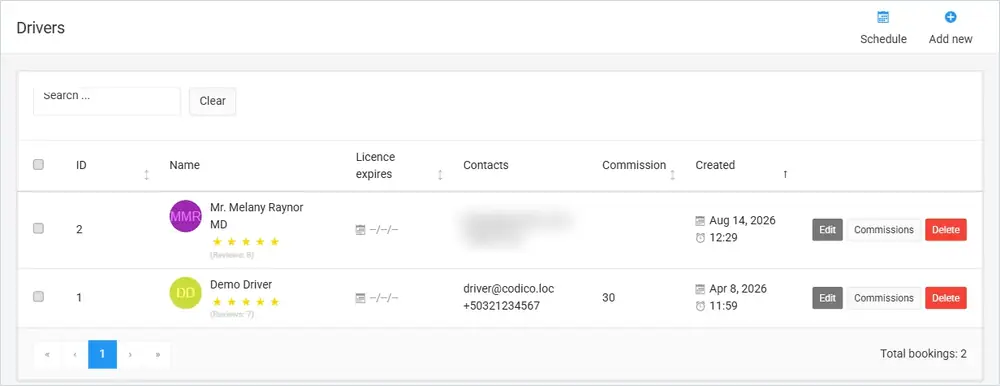
The Drivers list. Contact details of the first driver are blurred.
## The drivers list
| Column | What it shows |
| ------------------- | ------------------------------------------------------------------------ |
| **ID** | The driver's number in the system. |
| **Name** | The driver's name, photo and customer rating with the number of reviews. |
| **Licence expires** | When the driver's licence expires. |
| **Contacts** | The driver's email and phone number. |
| **Commission** | The driver commission rate. |
| **Created** | When the driver was added. |
The buttons at the top open the [Schedule](/documentation/bookings-and-dispatch/schedule.md) and add a new driver (**Add new**). Each row has **Edit**, **Commissions** and **Delete**.
## Add or edit a driver
Click **Add new**, or **Edit** in a driver's row.
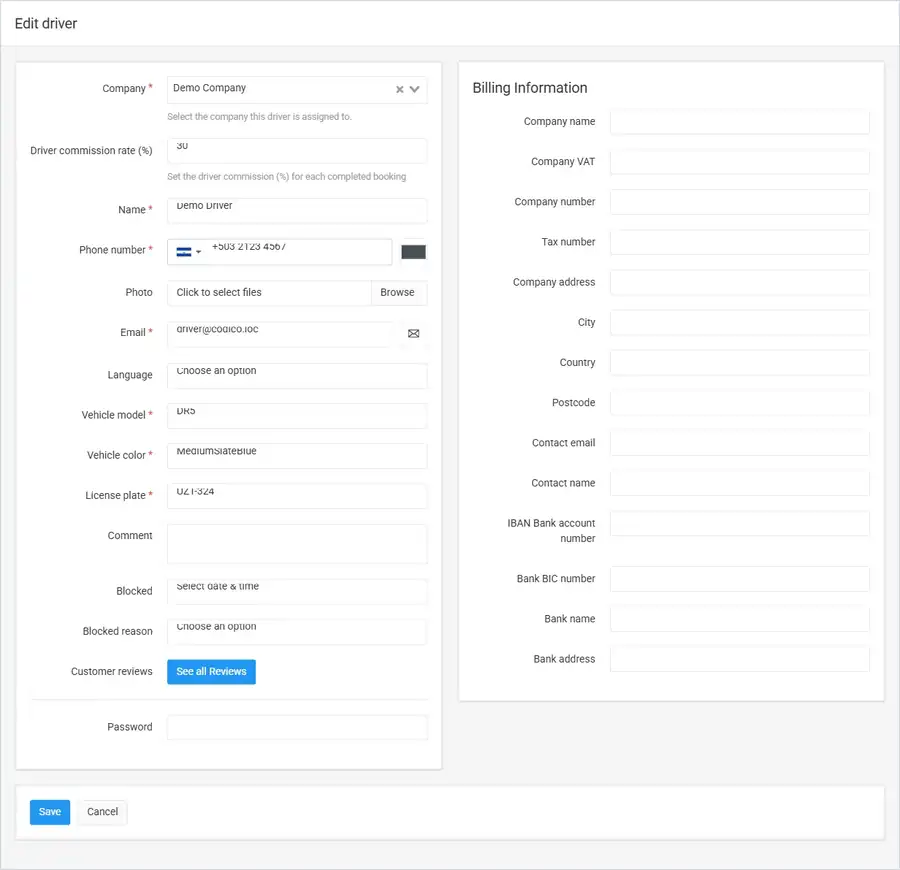
The driver form (demo data).
| Field | What it does |
| ------------------------------------------------------- | ------------------------------------------------------------------------------------------------------------------------------------------- |
| **Company** | The company this driver works for. Required. |
| **Driver commission rate (%)** | The driver's commission for each completed booking. |
| **Name**, **Phone number**, **Email** | The driver's name and contact details. The email is also the driver's login for the app. |
| **Photo** | The driver's photo. |
| **Language** | The driver's language. |
| **Vehicle model**, **Vehicle color**, **License plate** | The vehicle the driver uses. Required. The license plate is also shown on the [Schedule](/documentation/bookings-and-dispatch/schedule.md). |
| **Comment** | Internal notes about the driver. |
| **Blocked** / **Blocked reason** | Block the driver from a date and time, with a reason such as *Rules violation* or *Driver account scheduled for deletion*. |
| **Customer reviews** | **See all Reviews** shows the reviews customers left for this driver. |
| **Password** | Set or change the driver's password for the app. |
**Billing Information** on the right holds the driver's legal and bank details for payout invoices.
{% hint style="info" %}
A driver who works alone, without a company, is set up as a company with **Work as single driver (freelancer)** turned on. See [Companies](/documentation/people-and-companies/companies.md#general-information).
{% endhint %}
## Driver commissions
Click **Commissions** in a driver's row to open the driver's commission page. It shows the driver's commission rate, the number of **unprocessed bookings**, the total bookings amount and the driver commission, and lists every booking with the bookings amount, the company amount and the driver commission. Click **Generate Invoice** to create the driver's payout invoice for these bookings.
## Watch the video
{% embed url="" %}
Smarter Driver Management Tools for Better Performance
{% endembed %}
Learn more about [driver management](https://codico.io/taxi-dispatch-software/drivers-management/) on the CodiCo website.
---
# Agent Instructions
This documentation is published with GitBook. GitBook is the documentation platform designed so that both humans and AI agents can read, navigate, and reason over technical content effectively. Learn more at gitbook.com.
## Querying This Documentation
If you need additional information that is not directly available in this page, you can query the documentation by asking a question.
Perform an HTTP GET request on the following URL with the `ask` and `goal` query parameters:
```
GET https://codico-dispatch.gitbook.io/documentation/people-and-companies/drivers.md?ask=&goal=
```
`ask` is the immediate question: it should be specific, self-contained, and written in natural language.
`goal` is what the user is ultimately trying to achieve, the reason they need the answer. Sharing it helps GitBook give you a better, more relevant answer. A goal is most helpful when it describes the outcome the user wants rather than restating the question. For example, with `ask=how do I create an API token`, a goal like `automate deployments from our CI pipeline` lets GitBook tailor the answer to that use case.
The response will contain a direct answer to the question and relevant excerpts and sources from the documentation.
Use this mechanism when the answer is not explicitly present in the current page, you need clarification or additional context, or you want to retrieve related documentation sections.