> For the complete documentation index, see [llms.txt](https://codico-dispatch.gitbook.io/documentation/llms.txt). Markdown versions of documentation pages are available by appending `.md` to page URLs; this page is available as [Markdown](https://codico-dispatch.gitbook.io/documentation/people-and-companies/companies.md).
# Companies
Add your own transport company and your subcontractors, set their commission, service area, vehicle types and airports.
A **company** is a transport company that carries out rides: your own company or a subcontractor. Every driver belongs to a company, and every booking is assigned to a company before it is assigned to a driver. Open the list with **People & Companies → Companies**.
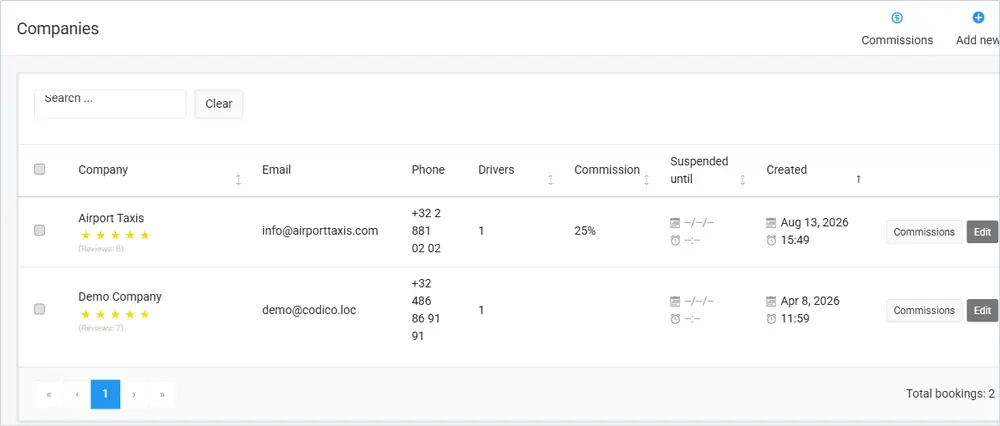
The Companies list. The rating under each name is the average of its customer reviews.
## The companies list
| Column | What it shows |
| --------------------- | ---------------------------------------------------------------------------- |
| **Company** | The company name and its customer rating with the number of reviews. |
| **Email** / **Phone** | The company's contact details. |
| **Drivers** | How many drivers belong to the company. |
| **Commission** | The admin commission you keep from each booking the company carries out. |
| **Suspended until** | If the company is suspended from new bookings, the date and time until when. |
| **Created** | When the company was added. |
Use **Search** to find a company and **Clear** to reset the search. Each row has three buttons: **Commissions** opens the company's commission overview, **Edit** opens the company form, and **Delete** removes the company.
{% hint style="warning" %}
Before you delete a company, move its drivers and open bookings to another company.
{% endhint %}
## Add or edit a company
Click **Add new** in the top right corner of the list, or **Edit** in a company's row.
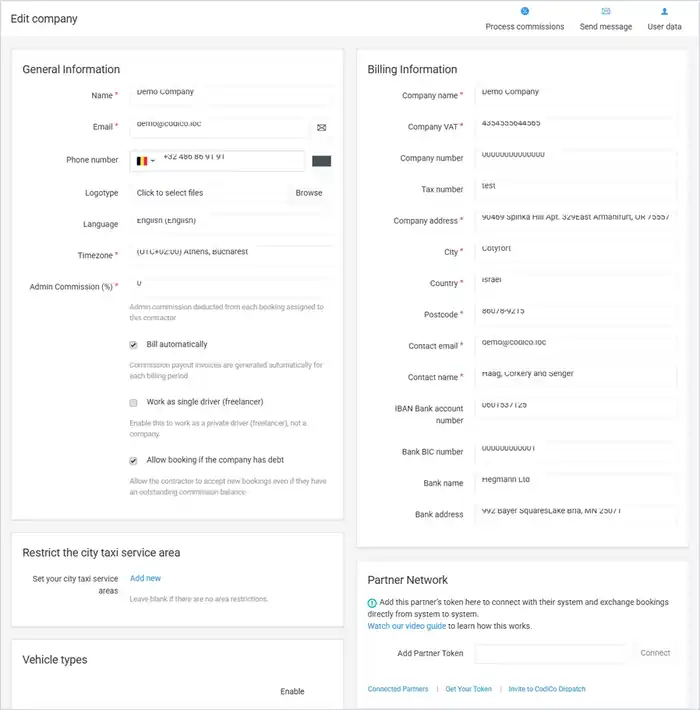
The company form (demo data).
### General Information
| Field | What it does |
| ----------------------------------------- | ------------------------------------------------------------------------------------------------------------ |
| **Name**, **Email**, **Phone number** | The company's name and contact details. Name and email are required. |
| **Logotype** | The company logo. |
| **Language** | The company's language. |
| **Timezone** | The company's time zone. Required. |
| **Admin Commission (%)** | The admin commission deducted from each booking assigned to this company. This is your share of the booking. |
| **Bill automatically** | When on, commission payout invoices are generated automatically for each billing period. |
| **Work as single driver (freelancer)** | Turn this on for a private driver who works alone rather than a company. |
| **Allow booking if the company has debt** | When on, the company can accept new bookings even if it has an outstanding commission balance. |
### Billing Information
The company's legal details for invoices: company name, VAT number, company and tax number, address, city, country and postcode, contact email and name, and bank details (IBAN, BIC, bank name and address).
### Restrict the city taxi service area
Click **Add new** to limit the areas where this company provides city taxi service. Leave the list empty if the company has no area restrictions. Areas are drawn in **Locations & Rules**.
### Vehicle types
Tick **Enable** for every vehicle class the company provides.
### Partner Network
Connect this company to another CodiCo Dispatch system so that the two systems exchange bookings directly. Paste the partner's token in **Add Partner Token** and click **Connect**. The links below the field show your **Connected Partners**, let you **Get Your Token** to share with a partner, and **Invite to CodiCo Dispatch** a company that does not use CodiCo yet. See the [Partner Network](https://codico.io/taxi-dispatch-software/partner-network/) feature page for how it works.
### List of airports that you service
Choose an **Airport** and a **Direction** and click **Add** to tell the system which airports the company serves. Direction can be **Both**, **To** or **From** the airport. The airports themselves are maintained in **Locations & Rules → Airports**.
### Buttons at the top of the form
The top of the company form has three buttons: **Process commissions**, **Send message** and **User data**.
## Commissions and payouts
Click **Commissions** at the top of the companies list to see the balance with every company.
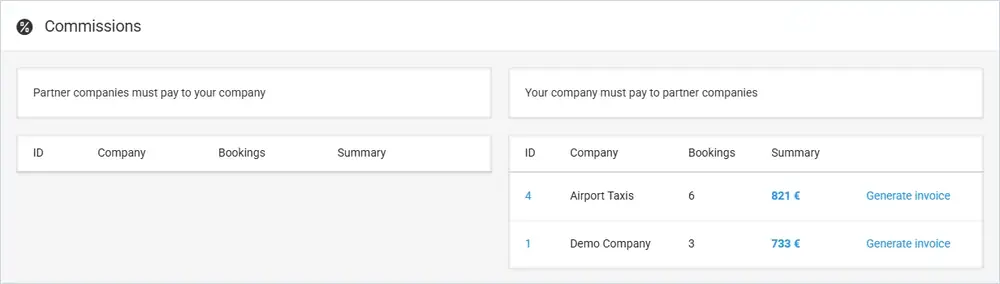
The Commissions overview.
The page has two tables:
* **Partner companies must pay to your company** — the amounts companies owe you.
* **Your company must pay to partner companies** — the payouts you owe for rides companies carried out for you.
Each row shows the company, the number of bookings and the total amount. Click **Generate invoice** to create the invoice for that company.
## Watch the video
This video shows how the companies you work with can add their own prices:
{% embed url="" %}
Companies Prices — How your partners can add their prices
{% endembed %}
Read more about [driver and company management](https://codico.io/taxi-dispatch-software/drivers-management/) and [automated payouts](https://codico.io/taxi-dispatch-software/automation/) on the CodiCo website.
---
# Agent Instructions
This documentation is published with GitBook. GitBook is the documentation platform designed so that both humans and AI agents can read, navigate, and reason over technical content effectively. Learn more at gitbook.com.
## Querying This Documentation
If you need additional information that is not directly available in this page, you can query the documentation by asking a question.
Perform an HTTP GET request on the following URL with the `ask` and `goal` query parameters:
```
GET https://codico-dispatch.gitbook.io/documentation/people-and-companies/companies.md?ask=&goal=
```
`ask` is the immediate question: it should be specific, self-contained, and written in natural language.
`goal` is what the user is ultimately trying to achieve, the reason they need the answer. Sharing it helps GitBook give you a better, more relevant answer. A goal is most helpful when it describes the outcome the user wants rather than restating the question. For example, with `ask=how do I create an API token`, a goal like `automate deployments from our CI pipeline` lets GitBook tailor the answer to that use case.
The response will contain a direct answer to the question and relevant excerpts and sources from the documentation.
Use this mechanism when the answer is not explicitly present in the current page, you need clarification or additional context, or you want to retrieve related documentation sections.