> For the complete documentation index, see [llms.txt](https://codico-dispatch.gitbook.io/documentation/llms.txt). Markdown versions of documentation pages are available by appending `.md` to page URLs; this page is available as [Markdown](https://codico-dispatch.gitbook.io/documentation/invoices-and-payments.md).
# Invoices & Payments
Track customer payments, partner and affiliate invoices, and payouts to companies.
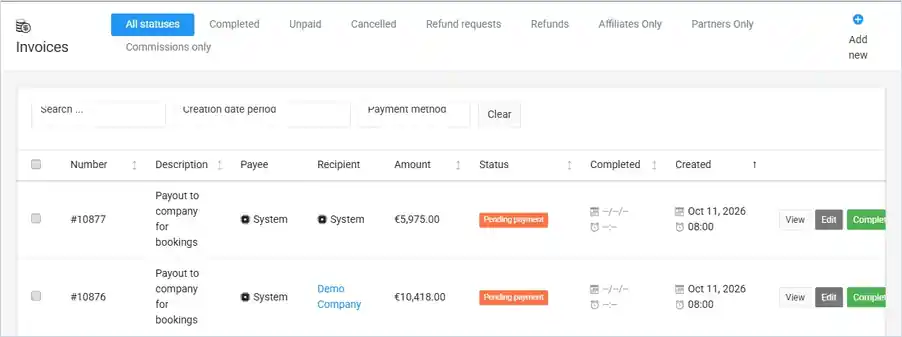
**Invoices** is the list of all payment orders in the system: payments for bookings, payouts to companies, and invoices for affiliates, partners and commissions. Open it from the main menu with **Invoices**.
The Invoices list (demo data).
## Filter the list
The tabs at the top filter the list:
| Tab | Shows |
| --------------------------------- | -------------------------------------------------------------------------------- |
| **All statuses** | Every payment order. |
| **Completed** | Paid orders. |
| **Unpaid** | Orders still waiting for payment. |
| **Cancelled** | Cancelled orders. |
| **Refund requests** / **Refunds** | Orders with a refund requested or made. |
| **Affiliates Only** | Orders for [affiliates](/documentation/people-and-companies/affiliates.md). |
| **Partners Only** | Orders for [referral partners](/documentation/people-and-companies/partners.md). |
| **Commissions only** | Commission orders. |
You can also **Search**, filter by **Creation date period** and by **Payment method** (*Cash*, *Credit card*, *Bancontact*, *On Invoice*). **Clear** resets the filters.
## What each row shows
| Column | Meaning |
| --------------------------- | ----------------------------------------------------------------------------------------------------------------------------------------- |
| **Number** | The payment order number. |
| **Description** | What the order is for, for example *Booking number: #07314, #07314/B* (an outward and a return trip) or *Payout to company for bookings*. |
| **Payee** / **Recipient** | Who pays and who receives. *System* is your own business. |
| **Amount** | The total of the order. |
| **Status** | *Pending payment*, *Partially paid* or *Complete payment*, with the payment method under it. |
| **Completed** / **Created** | When the order was paid and when it was created. |
Each row has three buttons:
* **View** opens the order with its items and total. A payout to a company lists one line per booking (*Company amount for bookings: #…*) and a line for *Payments received by cash*.
* **Edit** changes the order.
* **Complete** marks an unpaid order as paid. It is shown for orders with the status *Pending payment*.
{% hint style="warning" %}
**Complete** records a payment. Use it only when the money has actually been received or sent.
{% endhint %}
## Create a payment order manually
Click **Add new** to create a payment order by hand, for example for an extra service that was not part of a booking.
| Field | What to enter |
| --------------- | -------------------------------------------------------------------------------------------------------------------- |
| **Payee** | Who pays. Required. |
| **Currency** | The currency of the order. Required. |
| **Description** | Optional text shown on the order. |
| **Order items** | One or more lines, each with an **Item description** and **Item amount**. Click **Add new** for each line. Required. |
The **Total amount** is calculated from the items. Click **Save** to create the order.
## Payouts and commissions
Commissions for companies and drivers are tracked on their own pages:
* For a company, see [Companies → Commissions](/documentation/people-and-companies/companies.md).
* For a driver, see [Drivers](/documentation/people-and-companies/drivers.md) (the **Commissions** button and **Generate Invoice**).
Online payments by card and other methods need a payment provider. These are set up in **System Settings → Payments & Billing**.
Read more about [payments in CodiCo Dispatch](https://codico.io/taxi-dispatch-software/payments/) on the CodiCo website.
---
# Agent Instructions
This documentation is published with GitBook. GitBook is the documentation platform designed so that both humans and AI agents can read, navigate, and reason over technical content effectively. Learn more at gitbook.com.
## Querying This Documentation
If you need additional information that is not directly available in this page, you can query the documentation by asking a question.
Perform an HTTP GET request on the following URL with the `ask` and `goal` query parameters:
```
GET https://codico-dispatch.gitbook.io/documentation/invoices-and-payments.md?ask=&goal=
```
`ask` is the immediate question: it should be specific, self-contained, and written in natural language.
`goal` is what the user is ultimately trying to achieve, the reason they need the answer. Sharing it helps GitBook give you a better, more relevant answer. A goal is most helpful when it describes the outcome the user wants rather than restating the question. For example, with `ask=how do I create an API token`, a goal like `automate deployments from our CI pipeline` lets GitBook tailor the answer to that use case.
The response will contain a direct answer to the question and relevant excerpts and sources from the documentation.
Use this mechanism when the answer is not explicitly present in the current page, you need clarification or additional context, or you want to retrieve related documentation sections.