> For the complete documentation index, see [llms.txt](https://codico-dispatch.gitbook.io/documentation/llms.txt). Markdown versions of documentation pages are available by appending `.md` to page URLs; this page is available as [Markdown](https://codico-dispatch.gitbook.io/documentation/fleet-and-pricing/vehicle-classes.md).
# Vehicle Classes
Add vehicle classes, set their capacity and base prices.
A **vehicle class** is the type of vehicle your customers choose in the booking form, such as Saloon, Estate, Minibus or a Mercedes S Class. Open the list with **Fleet & Pricing → Vehicles**.
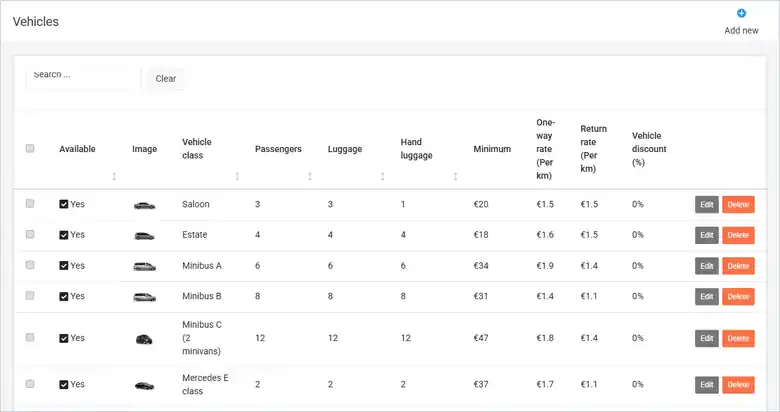
The Vehicles list (demo data).
The list shows for each class whether it is **Available**, its image, the number of **Passengers**, **Luggage** and **Hand luggage**, the **Minimum** fare, the **One-way rate (Per km)**, the **Return rate (Per km)** and the **Vehicle discount (%)**. Use **Edit** to change a class, **Delete** to remove it and **Add new** to create one.
## Add or edit a vehicle class
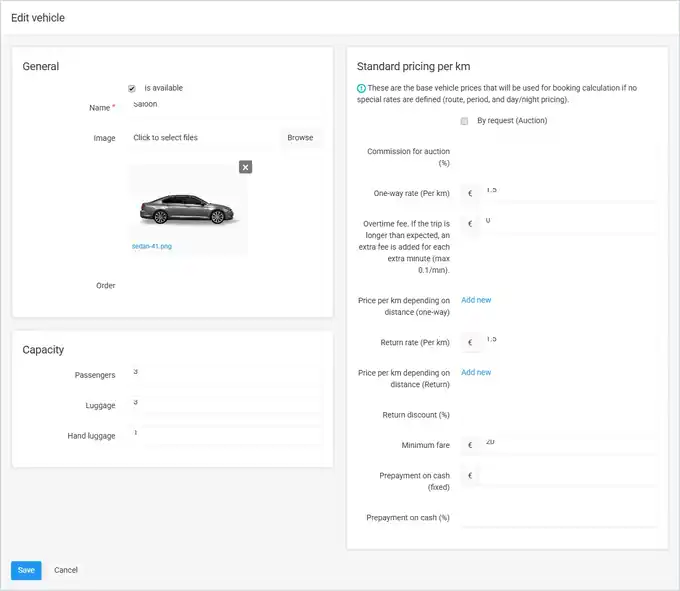
The vehicle class form.
### General
| Field | What it does |
| ---------------- | ----------------------------------------------- |
| **is available** | When off, the class is not offered for booking. |
| **Name** | The name customers see, for example *Saloon*. |
| **Image** | The picture shown in the booking form. |
| **Order** | The display order of the class. |
### Capacity
**Passengers**, **Luggage** and **Hand luggage** — the maximum the vehicle carries.
### Standard pricing per km
These are the **base rates** used to calculate a booking when no special rate (route, period, day & night) is defined.
| Field | What it does |
| ----------------------------------------------------------- | ------------------------------------------------------------------------------------------------------------------------------------------------------------------------------------------------ |
| **By request (Auction)** / **Commission for auction (%)** | Turns on price requests for this class instead of a calculated price, with the commission you keep. See [Price offers](/documentation/bookings-and-dispatch/assigning-bookings.md#price-offers). |
| **One-way rate (Per km)** | The price per kilometre for a one-way trip. |
| **Overtime fee** | An extra fee for each minute the trip takes longer than expected (maximum 0.1 per minute). |
| **Price per km depending on distance (one-way)** | Click **Add new** to set different per-kilometre rates for distance ranges. |
| **Return rate (Per km)** | The price per kilometre for the return leg. |
| **Price per km depending on distance (Return)** | Distance ranges for the return leg. |
| **Return discount (%)** | A discount on round trips. |
| **Minimum fare** | The lowest price for any trip in this class. |
| **Prepayment on cash (fixed)** / **Prepayment on cash (%)** | The amount the customer pays online in advance when paying the rest in cash, as a fixed amount or a percentage. |
{% hint style="success" %}
**Tip:** Which vehicle classes a transport company can carry out is set per company in **People & Companies → Companies → Vehicle types**. See [Companies](/documentation/people-and-companies/companies.md#vehicle-types).
{% endhint %}
---
# Agent Instructions
This documentation is published with GitBook. GitBook is the documentation platform designed so that both humans and AI agents can read, navigate, and reason over technical content effectively. Learn more at gitbook.com.
## Querying This Documentation
If you need additional information that is not directly available in this page, you can query the documentation by asking a question.
Perform an HTTP GET request on the following URL with the `ask` and `goal` query parameters:
```
GET https://codico-dispatch.gitbook.io/documentation/fleet-and-pricing/vehicle-classes.md?ask=&goal=
```
`ask` is the immediate question: it should be specific, self-contained, and written in natural language.
`goal` is what the user is ultimately trying to achieve, the reason they need the answer. Sharing it helps GitBook give you a better, more relevant answer. A goal is most helpful when it describes the outcome the user wants rather than restating the question. For example, with `ask=how do I create an API token`, a goal like `automate deployments from our CI pipeline` lets GitBook tailor the answer to that use case.
The response will contain a direct answer to the question and relevant excerpts and sources from the documentation.
Use this mechanism when the answer is not explicitly present in the current page, you need clarification or additional context, or you want to retrieve related documentation sections.